What does a high or low battery mean on my Garmin?
https://support.garmin.com/en-US/?faq=VOFJAsiXut9K19k1qEn5W5
Body Battery Frequently Asked Questions
Body Battery is a feature that uses a combination of heart rate variability, stress, and activity to estimate a user’s energy reserves throughout the day. It records and displays a number from 1-100 that represents the individual’s energy level.
The higher the number, the more energy the user should have to complete tasks and activities. A lower number may indicate it is time to conserve energy. The unique aspect of Body Battery is that it is a cumulative metric that builds a picture of a user’s energy over hours and days.
Important?
Body Battery can be used to help manage a user’s day. When the number is high, it should mean the user has enough energy for a workout or exercise. Conversely, when the value is low, it may be a good idea to conserve and rest.
It can also be used to learn how the body reacts to various situations and stimuli. For example, if the Body Battery shows a low number in the morning, the user may be able to look at the past few days of cumulative measurements to identify what may have been the cause.
Should My Body Battery Always Be High?
- The Body Battery should generally be highest after waking up from a restful night’s sleep, then drain naturally as the user goes about the day.
- Vigorous activity will drain the battery faster, but this is not necessarily a bad thing.
- Regular exercise, activity, and recovery should increase the body’s resiliency and stamina over time.
- Body Battery can be used to help manage when and how long exercise can happen, as well as encourage enough recharge to handle an upcoming activity or a busy day.
What Does Charged and Drained Mean?
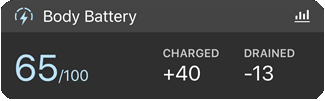
- For compatible products, charged and drained are displayed in Garmin Connect, showing how many points of Body Battery was recharged or recovered vs. how many were spent or used up.
- Ideally, there should be a similar level of each at the end of the day, indicating a balance of activity and recovery.
- Too much of one without the other is not recommended.
- The charged and drained numbers are shown for a 24 hour period starting and ending at midnight.
- Garmin Connect can also display user specific messaging giving insights about how much your Body Battery has charged or drained since bedtime or waking up for the day.
- These insights are designed to give you a glimpse into a narrower timeframe instead of the more broad information over the entire day.
How Do I Recharge My Body Battery?
Wearing the watch to bed and getting a good night’s sleep is the best thing to do to charge. Try to avoid things that hinder restful sleep such as caffeine, alcohol, or exercising too close to bedtime as those will delay recovery. Eating healthy, while always a good idea, does not directly impact the Body Battery metric. Similarly, energy shots or other caffeine-based drinks may increase alertness temporarily but do not actually increase Body Battery or slow down your Body Battery drain.
Why Is My Body Battery Still Low After Sleeping?
Your perception of how you feel and the cumulative effect of stress and sleep quality may not always be in alignment. This is especially true if you have multiple days in a row that hit the upper or lower limit of the Body Battery. Other factors including tossing and turning or waking up frequently at night, which can result in a lower score in the morning.
My Body Battery Appears to Be Stuck at 5%
If you have a new device, or if you recently reset or restored your device to its factory default settings, it may require 5-7 days to learn or re-learn your body. During this time, you may see the Body Battery stuck at 5%. If you reset the watch (again), this 5-7 day period will start over. After about a week, the Body Battery should charge and discharge as expected.
NOTE: For some Garmin devices, the analysis that drives your Body Battery and track all-day stress levels can lose the calibration needed to provide personalized insight. In these occasions, you may see your Body Battery drain to 5 and stay there until the analysis has enough data to recalibrate your physiological baseline. This personal recalibration process can take several days.
What Happens When I Do Not Wear My Watch?
The Body Battery metric will estimate the charging or draining during short periods when the device is off. If you do not wear it for several hours or longer, the value will reset based on a model and continue from that point once worn.
After wearing the device continuously for a full day, the values should correlate closely to what your Body Battery should be. The more you wear it, the more accurate it should be.
How Is Body Battery Tracked If I Wear Multiple Watches?
If you alternate between devices throughout the day, the body battery data in Garmin Connect will only be from the watch set as your Primary Wearable Device. However, you will still be able to see body battery data on the watch widget/glance screen from the non-preferred tracker during the time it is worn.
NOTE: Body battery is not a feature that utilizes TrueUp so you may see a difference between the body battery stats from one watch to the other.
What Else Affects My Body Battery Besides a Workout?
Anything that can affect your heart rate variability can accelerate your Body Battery drain or slow down a charge. This can include physical and emotional duress as well as sickness. Other factors include elevated heart rate, both all-day and during exercise. If your watch is detecting an elevated heart rate and stress, this will cause your Body Battery to drain.
What If I Train With Another Garmin Device That Does Not Have Body Battery?
We recommend wearing your watch along with your other Garmin device to ensure continuous Body Battery measurements. Information recorded from a device that does not feature Body Battery will not be included in the Body Battery calculation.
How Does Body Battery Interact With Activity and Stress?
The chart below details certain activities, habits, and stresses that affect Body Battery.
| External Physical Factors | Positive Emotions |
|
|
| Internal Physical Factors | Negative Emotions |
|
|
NOTE: Food intake and/or caffeine is not expected to show a recharge in your Body Battery even though you feel that you have more energy after consumption. Stimulants (such as caffeine) may actually indirectly result in a lower Body Battery (over time) if intake occurs at a time where sleep could be affected, as sleep time is the most crucial time for Body Battery to recharge.
Related
https://support.garmin.com/en-US/?faq=WT9BmhjacO4ZpxbCc0EKn9
What Is the Stress Level Feature on My Garmin Device?
The stress level feature allows a user to determine their current level of stress based on their heart-rate variability. When using the feature, the watch uses heart rate data to determine the interval between each heartbeat. The variable length of time in between each heartbeat is regulated by the body’s autonomic nervous system. The less variability between beats equals higher stress levels, whereas the increase in variability indicates less stress. Some watches will prompt you when it detects a high level of stress offering you the option to reduce it through a breathing exercise. Some watches also provide all-day stress tracking so you can see your trends throughout the day and over time.
NOTE: Third-party chest strap heart rate monitors may not provide HRV data. If a chest strap heart rate monitor is necessary for the HRV features you are using, we recommend using a Garmin heart rate monitor. HRV data is also not collected while an activity is in a paused or “Resume Later” state.
What Do the Stress Level Numbers Mean?
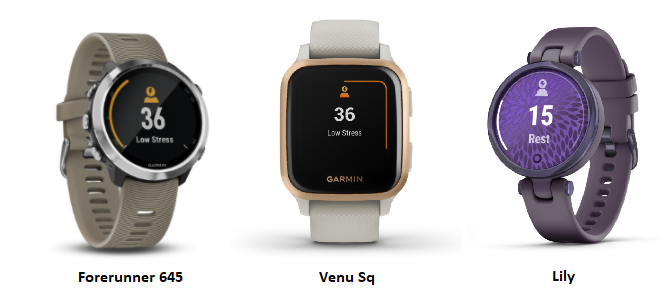
Devices will provide a stress level between 0 and 100, which correspond to the following scale:
- 0–25: Resting state
- 26–50: Low stress
- 51–75: Medium stress
- 76–100: High stress
Training, physical activity, sleep, nutrition, and various external factors could impact your stress level. Wearing your device both day and night will return the most consistent, accurate results. If you are too active to determine stress level (such as during a workout), a stress level will not be recorded.
How Can I View All-Day Stress Data?
All-day stress tracking can be viewed from the stress widget on a device, and in Garmin Connect. To view the data in the greatest detail in Garmin Connect, select your platform below for instructions.
NOTE: The stress value displayed is the overall stress value for the day. The live stress value is only available on the device itself. Open the Garmin Connect app.
- Open the Garmin Connect app.
- Access the menu:
- Android: Select
 (top left).
 - iOS: Select More (bottom right).
- Android: Select
- Select Health Stats.
- Select Stress.
- From here, you can view your daily timeline, daily averages over time, and a daily breakdown of your stress values.
If Stress data is available, you can also add the Stress card to your My Day view for quick access. See Editing the My Day View in the Garmin Connect App for further assistance.